dccbot


An IRC XDCC download bot written in python with aiohttp and irc.py.
Features
- join channels (auto-join on connect, with
also_joincascades) - send messages to channels or users
- NickServ authentication
- random nickname generation
- TLS/SSL server connections (with optional certificate verification bypass)
- DCC file transfer support (SEND / RESUME / SSEND)
- SSL DCC (SSEND) support
- passive DCC (incoming connections) with configurable listen IP and port range
- MIME type filtering for received files
- file size limits
- private IP filtering for DCC transfers
- transfer cancellation via API
- per-bot send queue throttling
xdcc sendrequests to the same bot; numericxdcc send/xdcc batchranges (e.g.xdcc batch 1-5) are expanded into individual queued sends, so range requests also work on bots without batch support - auto-disconnect from idle servers and channels
- MD5 verification of completed transfers
- incomplete file suffix support (auto-renamed on completion)
Installation
From source
git clone https://github.com/luni/dccbot.git
cd dccbot
uv sync
cp config.json.sample config.json
# edit config.json, then:
uv run python bot.py
From a release
Each release ships a wheel and a source distribution on the releases page:
uv tool install ./dccbot-0.4.0-py3-none-any.whl   # or: pipx install / pip install
dccbot --config /path/to/config.json
Running as a systemd user service
Copy dccbot.service to ~/.config/systemd/user/, adjust the paths in
ExecStart to your install, then:
systemctl --user daemon-reload
systemctl --user enable --now dccbot
# optional: keep it running after logout
loginctl enable-linger "$USER"
Usage
Configuration
The bot can be configured by creating a config.json file in the current working
directory. The configuration file should contain a json object with the following
keys:
servers: a dictionary of servers the bot can connect to, keyed by server address. Each server is an object with the following keys:nick: the nickname to use when connecting to the server, default: dccbotnickserv_password: the password to use when connecting to the server, optionaluse_tls: a boolean indicating whether to use tls when connecting to the serververify_ssl: a boolean indicating whether to verify the server ssl certificaterandom_nick: a boolean indicating whether to use a random nickname when connecting to the serverport: the port to connect to, default: 6667channels: a list of channels to join when connecting to the server, optionalalso_join: a dictionary of channels to join if the specific channel is joinedrewrite_to_ssend: a list of channels to rewrite xdcc send to ssend for users in this channels
default_server_config: same asservers, used if the server connected to is not inserversdefault_download_path: the directory where the bot should download filesallowed_mimetypes: a list of mimetypes the bot should allow to be sent over dccmax_file_size: the maximum size of a file to be sent over dccchannel_idle_timeout: the number of seconds a channel can be idle before the bot will part the channelserver_idle_timeout: the number of seconds a server can be idle before the bot will disconnect from the serverresume_timeout: the number of seconds to wait for a resume response from the bot before aborting the transfertransfer_list_timeout: the number of seconds after a finished/aborted transfer is removed from the transfer list in /info responseauto_md5sum: a boolean indicating to verify the md5sum of the file if the bot sends the md5sum as message on start of transfer or after successful transferincomplete_suffix: a string that is appended to the filename while downloading. If file was transferred successfully this suffix is removed.ssend_map: a dictionary of users which support ssend (secure send).xdcc sendcommand is replaced withxdcc ssendfor these users. This tells the XDCC bot to use TLS-wrapped DCC (SDCC).rewrite_to_ssend: a list of channels wherexdcc sendis rewritten toxdcc ssend.allow_private_ips: a boolean indicating whether to allow private ips in dcc send commandpassive_dcc: A boolean indicating whether to accept passive DCC transfers (where the peer sendsport=0and a token, and the bot listens for an incoming connection). This option can also be set per-server.passive_dcc_listen_ip: The reachable IP address to bind and advertise the passive DCC listener on. If omitted, it defaults to the hostname’s IP.0.0.0.0is treated as unset. This option can also be set per-server.passive_dcc_port_range: A list of two integers[min_port, max_port]defining the port range to try binding the listener to. If omitted, the OS assigns a port. This option can also be set per-server.passive_dcc_timeout: The number of seconds to wait for the peer to connect to the passive listener before aborting (default: 60). This option can also be set per-server.send_queue_delay: The minimum number of seconds between two queuedxdcc sendrequests to the same bot (default: 15). This option can also be set per-server.send_queue_cooldown: The number of seconds the bot must go without an active transfer (aftersend_queue_delay) before the next queuedxdcc sendto it goes out; a transfer starting in the meantime, e.g. the next file of anxdcc batch, restarts it (default: 5). This option can also be set per-server.send_queue_max_wait: The maximum number of seconds an active transfer may go without any progress before the queue moves on to the next item anyway, so a stuck transfer cannot stall the queue (default: 300). This option can also be set per-server.send_queue_max_concurrent: The maximum number of queue-triggered transfers allowed to run at the same time across all bots and servers (default: 0, meaning unlimited). Global only; sends to the same bot are always serialized per target regardless.dcc_ssl_cert: Optional path to a PEM certificate file for SDCC (SSEND). If provided,dcc_ssl_keymust also be set.dcc_ssl_key: Optional path to the PEM private key fordcc_ssl_cert. If either is omitted, a self-signed certificate is generated and cached in~/.local/share/dccbot/.http: a dictionary with the following keys:socket: the path to the socket to use for the http server (instead of host and port)port: the port to bind the http server to, default: 8080host: the host to bind the http server to, default: localhost- legacy keys
bind_addrandbind_portare still accepted for compatibility
API
The bot can be controlled using a simple web interface. The web interface is
available at http://localhost:8080/ by default.
POST /join: join a channelPOST /part: part a channelPOST /msg: send a message to a channel or user (queued per target, seesend_queue_*)POST /cancel: cancel a running transferPOST /shutdown: shutdown the botGET /info: get information about the current status of the bot (networks, current transfers, finished transfers, pending send queues)GET /ws: WebSocket endpoint for live transfer/queue updates and log streamingGET /swagger: interactive OpenAPI/Swagger UI documentationGET /static/: static web assets (unified web UI)
Additional browser features
/: unified web UI with current transfers, live log output, and websocket command input.
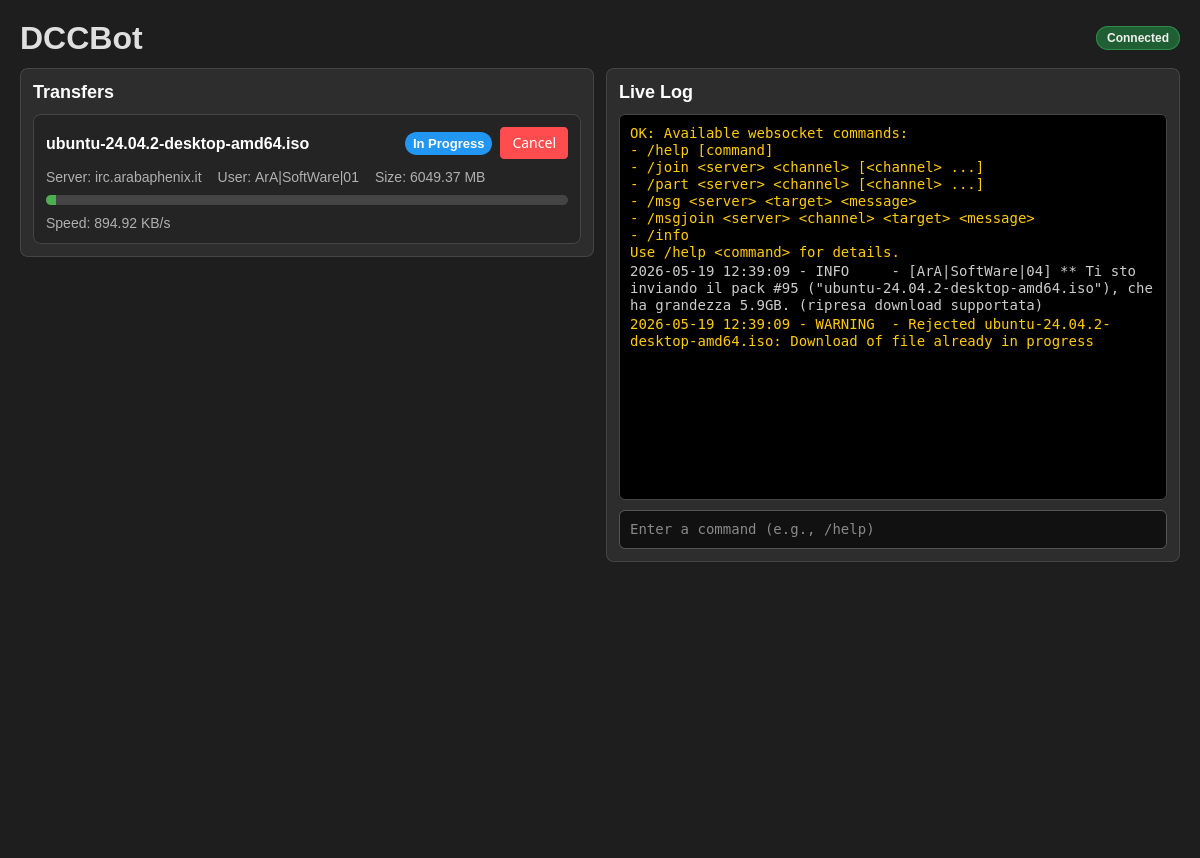
WebSocket command help
In the browser command input, use:
/helpto show all websocket commands and signatures/help <command>to show usage and an example for a single command
Supported websocket commands:
/help [command]/join <server> <channel> [<channel> ...]/part <server> <channel> [<channel> ...]/msg <server> <target> <message>/msgjoin <server> <channel> <target> <message>/info/queue/cancelqueue <server> <target> [index-or-message]
Browser Userscript for Easy Downloads
A Violentmonkey userscript is provided to add download buttons to popular XDCC search websites, making it easy to send download commands directly to your DCCBot.
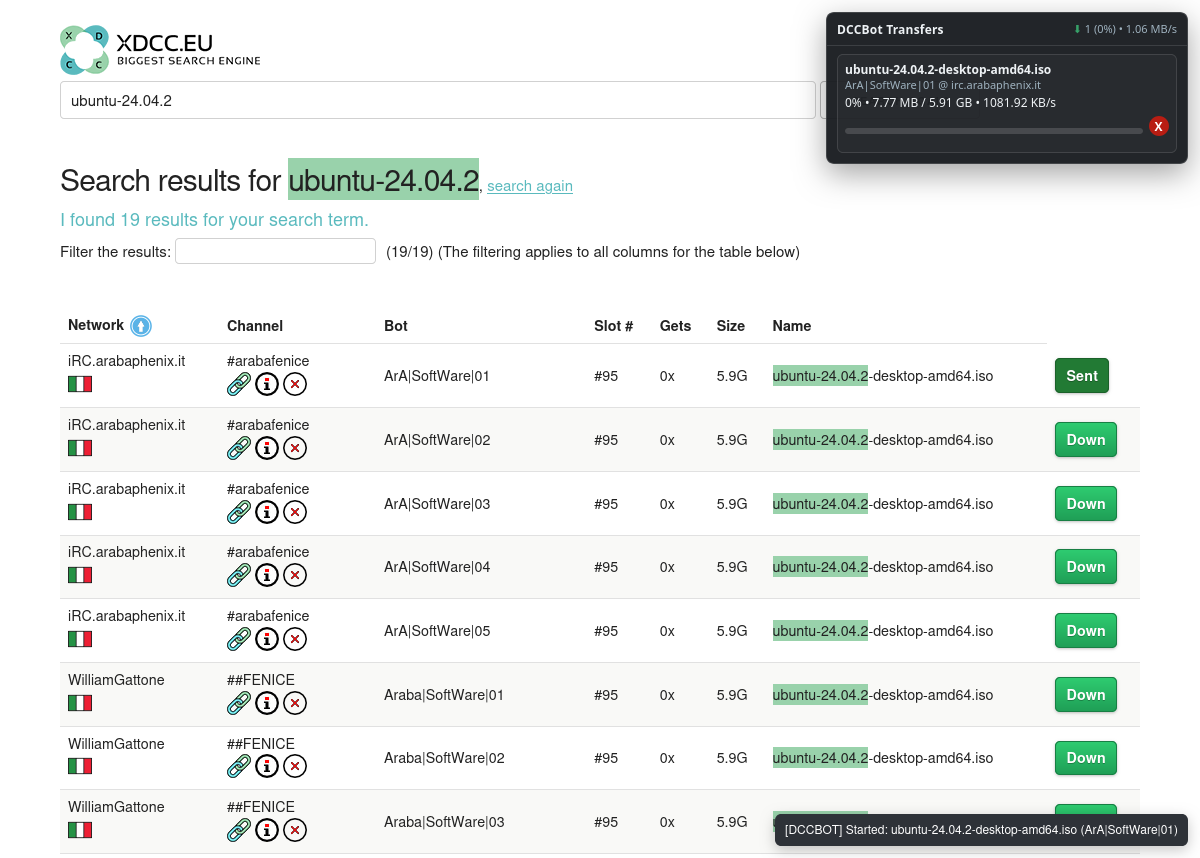
Supported Websites
- XDCC.eu
- NIBL
- xdcc.rocks
- xdcc.animk.info
- xdcc-search.com
- xdcc.info
- skullxdcc.com
- xdccsearch.com
Installation
- Install the Violentmonkey extension for your browser (open source and available for Chrome, Firefox, and other Chromium-based browsers)
- Click the following link to install the script: Install Script
Configuration
- After installation, click on the Violentmonkey extension icon
- Open the installed
add-dccbot-btnscript’s menu and choose “Set API Endpoint” - Enter your DCCBot API endpoint (e.g.,
http://localhost:8080)
Usage
- On supported sites (XDCC.eu, NIBL, xdcc.info, etc.), you’ll see a “Down” button next to each search result
- Click the button to automatically send the download command to your DCCBot
- For NIBL, you can also select multiple items and use the “Download selected” button to batch download
Features
-
One-click downloads from supported websites
- Batch download support on NIBL
- Customizable API endpoint
- Lightweight and fast
Developer / Testing
The repository includes a full local development and testing setup:
- Makefile targets:
make test,make test-integration,make irc-up,make irc-down,make mutation,make validate(format + lint + complexity + security + type-check + vulture) - Docker Compose:
docker compose up -d ircdstarts a local InspIRCd test server for integration tests;make irc-upadditionally starts the iroffer XDCC bot and a toxiproxy sidecar for network fault-injection tests - Mutation testing:
make mutationruns mutmut againstdccbot/(nightly in CI via.github/workflows/mutation.yml, results uploaded as an artifact) - Fault injection / negative paths:
tests/unit/test_fault_injection.pyandtests/unit/test_negative_paths.pycover injected filesystem/network/queue failures and malformed inputs;tests/integration/test_fault_injection.pyinjects real network faults (latency, resets, truncation, throttling) via toxiproxy - Dependabot: configured for pip (weekly) and GitHub Actions (monthly)
Contributions & Thanks
Contributions are welcome — open an issue or pull request on GitHub. Please make sure make validate and the test suite pass before submitting a PR.
Thanks to everyone who has contributed to DCCBot:
- Vincent Schoonenburg (@arkancrow) — per-bot send queue for
xdcc sendrequests (PR #36)